See It In Action
A round 54 mm, 4-layer RGB LED board designed in Altium Designer from a written spec to manufacturing files, unattended: 61 WS2812B-2020 LEDs in rings on the front; USB-C, ESD protection, fuse, STM32 and LDO on the back; a project library built from scratch with a symbol, footprint, 3D model and MPN for every part; stitched ground pours, a clean DRC, then Gerbers, drill files, BOM, pick-and-place and STEP.
From 5:45, a review round lists the issues found in the first pass and Claude fixes them: the USB data lines rerouted end to end as a 90 ohm coupled differential pair over the ground plane, realistic 3D models for every part built from their datasheet drawings, and finished schematics with title blocks on standard sheet sizes. The final design is in very good shape. I would still give it a manual tweaking pass before prototyping.
A schematic from a one-line spec
A 12 V to 3.3 V, 2 A buck converter around the TI TPS62130: datasheet, component values, symbols, schematic and a verified netlist.
A library part from a datasheet
The TPS62130 schematic symbol and footprint, built from the datasheet and checked against TI's package drawing.
Live Dashboard
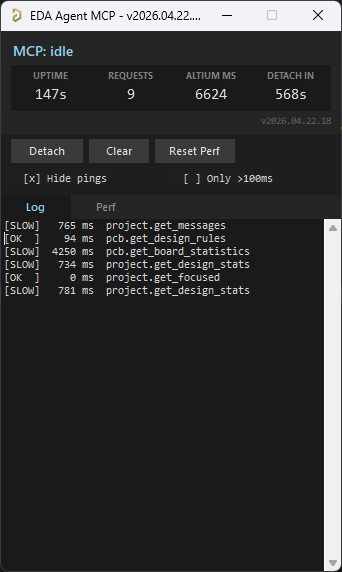
A floating Altium-side window shows status, request count, cumulative Altium-side time, auto-shutdown countdown, and a per-command log with durations. Hide pings filters the 30 s keep-alive traffic; Only >100ms isolates slow calls. The Detach button exits the polling loop cleanly; it saves nothing, so unsaved edits stay in the editor.
There's also a browser dashboard at http://127.0.0.1:8766, auto-started by the MCP server and focused on design review. A Review tab surfaces datasheet / MPN / manufacturer / footprint coverage gauges and an actionable issue queue (missing datasheet, missing MPN, orphan nets, …); Project, Components, Nets, Libraries and Plan tabs give live structured views. Click any component or net to open a detail drawer and one-click cross-probe it into Altium. Light / dark theme, server-sent-events live feed. The Open Dashboard button on the in-Altium status window launches it.
What It Does
eda-agent is a Model Context Protocol (MCP) server that lets an AI assistant, or any MCP-compatible client, interact with a live Altium Designer session. It exposes around 450 tools on Altium covering schematic, PCB, library, project, audit, render, SPICE, and a high-level design-agent surface over a persistent DelphiScript bridge. The AI reads the design you currently have open, asks questions about it, and can modify it in place while you watch.
This is not a batch tool that opens a project, runs a script, and exits. It is a live connection for as long as you want it: conversational design review, guided refactoring, ad-hoc BOM queries, bulk parameter changes, all on the project you currently have open.
Altium is the primary target. KiCad and EasyEDA Pro are available as additional backends, one chosen at startup, so each user sees only their own tool set. The KiCad backend drives the same core flows over KiCad's IPC API and kicad-cli: design review, DRC and ERC, reads, exports, PCB and library authoring, and end-to-end generation of a schematic, PCB and project from a design plan.
How It Works
- Altium Designer stays open and in full control of your design.
- A DelphiScript polling loop runs inside Altium's scripting engine.
eda-agent(Python, launched by your MCP client) sends commands via file-based IPC.- Altium executes, writes a response, and returns to polling.
- You see the changes happen live in Altium.
All intelligence lives in Python. The DelphiScript side is a pass-through layer for object iteration, property access, and process execution.
Highlights
450+ Altium Tools
Covering application, project, library, schematic, PCB, audit, render, SPICE, routing, and a high-level design-agent surface. Query, modify, create, and delete any supported object. 828 tools across all three backends.
Optional KiCad Backend
Altium is the default; a KiCad backend ships alongside it, chosen at startup with EDA_AGENT_BACKEND. It runs the same core flows over KiCad's IPC API and kicad-cli: EDA-agnostic review, DRC and ERC, reads, every export format, PCB and library authoring, and full project generation from a design plan.
Optional EasyEDA Pro Backend
A third backend, reached through a small browser extension you import into EasyEDA Pro. The connection runs the other way round from Altium: the editor dials out to the server, so nothing here can start EasyEDA or make it connect. It covers the schematic and PCB read set, the netlist, library search and authoring, exports, and the same EDA-agnostic review and audits. Every reply carries verified_live for the command it used, recorded from real sessions rather than assumed.
Generic Primitives
obj_query, obj_modify, obj_create, obj_delete, obj_run_process. Work on almost any schematic or PCB object via late-binding.
Bulk Batch Primitives
obj_batch_create, obj_batch_delete, obj_batch_modify, pcb_place_tracks, pcb_move_components, sch_place_wires, sch_place_components, sch_set_components_parameters, lib_add_pins, lib_add_symbol_lines, proj_get_connectivity_many, sim_attach_primitives, and more. These collapse N LLM turns into one IPC round-trip. Typical wall-time savings are 10 to 100x. When a single-item tool is called repeatedly, the response points at its batch variant.
Design Review Snapshot
design_review_snapshot bundles 8 to 12 review reads (components, nets, rules, diff, messages, stats, unrouted, BOM) into a single call. One turn instead of a dozen.
Canonical Circuit Blocks
design_add_circuit_block folds a whole block into a DesignPlan in one call, allocating refdes, wiring every pin to the right net and tagging power, ground and roles. Twelve blocks: decoupling, pull-up, pull-down, series resistor, voltage divider, RC low-pass and high-pass, LED indicator, crystal, pi filter, and low-side and high-side MOSFET switches. design_list_circuit_blocks returns each one's parameter contract, so nothing is guessed.
Drives the GUI Where There Is No API
A lot of Altium exists only as menus and dialogs. app_click_menu walks the real menu bar by name, app_list_open_dialogs reports what is on screen and whether Altium is stuck, and app_set_dialog_control, app_press_dialog_button and app_drive_dialogs answer them. None of it uses the scripting bridge, so it keeps working while a modal has the engine blocked. app_run_ui_command fires a command and answers its dialogs in one call, and the press that changes the design is gated behind allow_commit.
Finding the Right Tool
tool_guide answers in plain words what you are trying to do: the tool and what it needs first, the tool you were probably reaching for and why it acts on a different document, and what is genuinely impossible and why. tool_catalog searches by name, category or maturity. For clients that cap tool counts, EDA_AGENT_TOOLSET=minimal advertises just tool_catalog and tool_invoke, with every other tool still reachable through them.
Connectivity-Driven PCB Auto-Placement
pcb_plan_placement computes a from-scratch component layout: force-directed global placement, hard-shove legalisation, and a per-part orientation search (0/90/180/270) that minimises pin-level half-perimeter wirelength. It reads the netlist, or derives the connectivity graph straight from the PCB pad nets when no schematic is loaded. Pure analytical placement in Python; returns coordinates the AI can preview, refine, or apply.
SVG Render + Visual Self-Check
sch_render_svg and pcb_render_svg turn the live design into a standalone SVG, the PCB render using Altium's actual per-layer colours and visibility rather than a guessed palette. design_visual_review closes the loop: render → rasterise to PNG (headless browser) → score against a critique rubric, so the AI can see what it drew and fix it instead of working blind.
Synced Board Population
pcb_place_components drops footprints from a PcbLib straight onto the board. Synced mode links each part to its schematic source by UniqueId and creates / assigns the nets, giving real connectivity without the non-scriptable ECO dialog. A practical, automatable substitute for Update-PCB-Document.
31-Check Audit Suite
design_lint_report runs 31 rule checks in one IPC pass, schematic-side (parameter visibility, power-port orientation, floating ports, no-driver nets, duplicate designators, off-grid parts) and PCB-side (DNP variants, tented-via ratio, near-miss track endpoints, signal vias without a return, via antennas, parts outside the outline, pads too close to the edge, invalid regions). Each check is also a standalone audit_* MCP tool.
BOM HTML Export
proj_export_bom_html renders a styled, self-contained HTML bill of materials straight from the compiled project, grouped and shareable without Altium, ready to hand to procurement.
Datasheet-First Discipline
Every component-surfacing response carries a _datasheet_guidance block with per-part search queries. The rule set, shipped inside the package, forbids LLM-fabricated datasheet values and requires vendor-sourced data for any claim.
Sch ↔ PCB Crossref
obj_crossref_net compares the schematic pin list against the PCB pad list for a named net. It catches ECO drift, stale post-fabrication routing, and phantom nets introduced by port/sheet-entry rename conflicts.
SPICE Workflow
Audit every component for simulation readiness, attach SPICE primitives to passives in one pass, link vendor .mdl / .ckt files for active parts, then dispatch the simulator. Built-in guardrails against fabricated model files.
Focus-Independent Access
PCB queries succeed whether the user has a PCB tab, a schematic tab, or no tab in focus, as long as the project is open. No more "no PCB document is active" when the PCB is clearly loaded.
Fast & Compile-Cached
Persistent polling loop; ~10 ms per call in active mode. SmartCompile caches DM_Compile with a 2 s TTL so a multi-read review pays for one compile instead of a dozen. Explicit proj_force_recompile and proj_get_compile_freshness for cases that need fresh netlist state.
Deferred Save
Edits mark documents as modified in memory; disk writes happen on an explicit app_save_all, and app_detach saves only the documents that were edited. A clean document is never rewritten. Annotation runs silently too, without the annotate dialog.
Several Sessions, One Altium
Each AI session runs its own server and all of them share the one script loop in Altium. A session working alone is served straight through; when several have requests waiting, they take turns in 30 second slots between commands, so no session gets a second slot before every waiting session has had one.
Part Sourcing
part_search queries every enabled provider and merges the results, each hit attributed to the source that found it; part_fetch pulls one part's detail and datasheet_fetch downloads the datasheet. No provider is enabled by default and there is no silent fallback.
Design Agent Surface
Eight MCP tools (design_get_discipline, design_snapshot_inventory, design_validate_plan, design_preview_plan, design_execute_plan, design_audit_schematic, design_learn_from_layout, design_validate) let an LLM produce a structured DesignPlan JSON, preview the rendered sheet without touching Altium, instantiate it for real, audit the result for layout issues, and validate ERC + connectivity. Datasheet-first, NDA-isolated by construction.
Motif Composer + Sugiyama Placement
Three-layer placement strategy. Sugiyama / force-directed gives every part a baseline; the motif composer detects canonical sub-circuits (bypass cap, voltage divider, fb_divider, LC output, ...) via VF2 subgraph isomorphism and splats each match into its frozen canonical layout; canonical priors apply per-role-pair nudges (e.g. vcc_decoup sits 400 mils from its IC). A role-compatibility filter drops false positives (a structural RC-lowpass that's actually a decoupling cap stays out of the filter motif). Topology-agnostic: works for a buck, an LDO, an MCU, anything with a clean net graph.
Within-Block Wiring
Stub wires from each pin endpoint to the label / port (no more "floating net labels" ERC warnings), Manhattan routing between same-net pins, and rail consolidation that clusters power / ground pins so one VCC bar or GND triangle serves many pins instead of stacking N glyphs. Obstacle-aware: every L-path picks the orientation that crosses fewest component bodies, using real BoundingRectangle data queried from Altium.
Schematic Audit + Learn-from-Layout
design_audit_schematic returns structured {overlaps, wire_crossings, stacked_ports} with enough geometry for the planner to compute corrective moves, giving programmatic feedback without needing a visual snapshot. design_learn_from_layout diffs pre / post user edits and appends (part_role, anchor_role, dx, dy, rot_delta) rows that an offline aggregator turns into the placement priors the next run consumes.
Atomic-Parts Contract
Every existing-status Part carries mpn, footprint, datasheet_url. The inventory snapshot surfaces these per component; design_validate emits atomic_parts warnings when the contract is missed. Aligns with the KiCad Atomic / Digi-Key Library / atopile / JITX convention so generated designs are buildable, not just plausible.
Health, Doctor & Offline CLI
eda-agent health runs offline preconditions (workspace dir, pointer file, bundled scripts). eda-agent doctor talks to Altium for a full preflight: process running, polling responsive, version match, save_all canary, optional --library path checks. Without Altium at all, eda-agent review --offline, bom --offline and netlist --offline read a .SchDoc or .PrjPcb directly, with SARIF output and a --fail-on exit code for hardware CI.
Activity Logs
Every command is appended to workspace/activity.log as CSV (timestamps, durations, command, response size). The bridge also writes bridge_trace.log for IPC-level diagnostics. Forensic visibility when something misbehaves.
pip-installable
No admin rights, no installer, no touching Altium's config. Drop in the bundled DelphiScript project and you're done.
Live and Conversational
Altium stays open. You see every change happen in real time. Stop the AI at any moment and continue working manually.
Tool Categories
Plus 86 KiCad and 249 EasyEDA Pro tools, 828 in all. The full list, with each tool's maturity and whether it opens a dialog, is in the tool reference.
Example Use Cases
Full-project design review
One design_review_snapshot call gives the AI project info, design stats, components, nets, rules, diff, messages, board stats, and BOM, plus a datasheet-fetch checklist. The AI then grounds every recommendation in the vendor datasheets it fetched.
Schematic review
The AI reads your schematic live. Ask it anything a reviewer would:
Sch ↔ PCB drift detection
The response shows sch pins, PCB pads, matched, and the diff in each direction. A non-empty pcb_only list means the board was fabricated from an earlier revision of the schematic and a later edit broke the post-ECO merge. Catch this before the next ECO push rips routed connections.
SPICE simulation setup
sim_get_readiness partitions the design into ready / needs-primitive / needs-file. The AI batches primitives onto passives in one call, searches vendor sites for the IC models, attaches them, and reports any holdouts. It will not fabricate a SPICE model on its own.
Library hygiene
The last one uses lib_add_pins. One call places the whole pinout in a single transaction instead of 48 LLM turns.
PCB spot-checks
Place a board from connectivity
pcb_plan_placement returns a complete coordinate set, force-directed clustering plus a per-part orientation search that minimises pin-level half-perimeter wirelength, and reports the HPWL improvement over the starting scatter. The AI applies it with pcb_move_components in one IPC round-trip, then pcb_render_svg + design_visual_review let it actually look at the result and flag overlaps or awkward orientations before routing.
Bulk changes
Bulk tools like obj_batch_modify, pcb_move_components, and sch_place_components finish the whole operation in one IPC round-trip.
Autonomous schematic creation
The AI starts with design_get_discipline for the rules, runs design_snapshot_inventory across your .SchLib paths to bias choices toward existing parts (each one carrying mpn / footprint / datasheet_url per the atomic-parts contract), drafts a DesignPlan JSON, validates it offline with design_validate_plan, and renders an SVG preview with design_preview_plan. The whole pipeline (Sugiyama baseline + motif composer + canonical priors + within-block wiring) runs without touching Altium so the planner can inspect and iterate cheaply.
When the preview looks right, design_execute_plan instantiates everything for real: motif-aware placement of every existing-lib part, stub wires + Manhattan routing between same-net pins, rail consolidation for power / ground, and hidden Manufacturer / MPN / Datasheet parameters stamped on each refdes. design_audit_schematic then returns structured overlaps, wire-crossings, and stacked-port clusters with enough geometry for the planner to compute corrective placement_hints on the next pass. design_validate wraps ERC + unconnected-pins + compile messages. And when a user drags parts to fix layout, design_learn_from_layout appends the deltas to a priors log so the next run starts closer to what the user actually wanted.
Requirements
- Windows (Altium Designer is Windows-only)
- Python 3.11+
- Altium Designer, recent versions (AD20+ preferred)
- An MCP-compatible client (Claude Desktop, Claude Code, or any other MCP host)
- Optional, for the KiCad backend: KiCad 9+ with its API server enabled (Preferences → Plugins → KiCad API server), plus
pip install -e .[kicad] - Optional, for the EasyEDA Pro backend: the eda-agent extension imported into EasyEDA Pro
Installation
Then register the scripts as a Global Project in Altium (DXP → Preferences → Scripting System → Global Projects) and launch the polling loop via File → Run Script... → StartMCPServer. Full setup details in the README.
Claude Code
Verify the connection with /mcp in a Claude Code session: altium should be listed as connected.
Other MCP clients
The server speaks standard MCP over stdio; any client that accepts a local stdio command will work. Invoke eda-agent (or eda-agent serve) as the subprocess, or python -m eda_agent if it is not on your PATH.
Known Limitations
This tool is experimental. Read this before running on a design you haven't backed up.
- Altium DelphiScript engine can crash. Some tool paths trigger DelphiScript compile or runtime errors. The polling loop halts mid-execution and the MCP client times out. Recovery: stop the script in Altium's Script IDE (red Stop button or Ctrl+F3) and re-launch
StartMCPServer. Every identified crash is either fixed or guarded; report new ones with the exact identifier or line. - Built-in Altium buttons that depend on internal scripting can pause while the polling loop is active, because Altium's scripting engine is single-threaded. The loop releases on
app_detach(within ~500 ms) or after 10 minutes of total silence from the MCP client. - ECO (sch → PCB update) opens a modal, and there is no silent API.
proj_sync_pcbruns Altium's compare, which blocks on the change-order dialog and refuses while a schematic is focused. To drive it end to end,app_run_ui_commandclicks the Update PCB Document menu and answers the dialogs in one call; withoutallow_commitit presents the change order instead of applying it. - UI automation uses real keyboard and mouse input. The
app_*GUI tools take focus while they run, so they will interrupt you if you are typing. Every event is checked against Altium being in front and refused outside Altium's own windows. SetEDA_AGENT_UI_AUTOMATION=0to switch them off entirely. - Text above Latin-1 becomes question marks. Altium's script strings are single-byte, so characters such as the ohm sign or CJK text arrive as
?. Accented Latin, the micro sign and the degree sign survive. - Tools vary in maturity. Generic primitives and core application/project tools are best-tested. Some PCB modify operations (polygon repour, room creation, align-components) are less battle-tested. Queries are generally safer than mutations.
Frequently Asked Questions
What is eda-agent?
eda-agent is a free, open-source Model Context Protocol (MCP) server that connects an AI assistant to a live Altium Designer session. The AI can read the open project, review it, and edit schematics, PCBs and libraries while you watch. It exposes around 450 Altium tools, with KiCad and EasyEDA Pro available as additional backends.
Can Claude work with Altium Designer?
Yes. Install eda-agent, start its script inside Altium, and register it with Claude Code or Claude Desktop. Claude can then query components and nets, run design reviews and DRC, and make changes in the open project. Any other MCP-compatible client works the same way.
Does eda-agent work with KiCad or EasyEDA Pro?
Yes. Altium is the primary target, and KiCad 9+ (over its IPC API and kicad-cli) and EasyEDA Pro (through a browser extension) are included as backends. You choose one when the server starts.
Can it review a schematic or PCB design?
Yes. One call collects the whole project for review, a 31-check audit suite covers common schematic and PCB problems, and a datasheet-first rule set stops the AI from making up component values. It is a strong first pass, not a replacement for an experienced engineer.
Is eda-agent free for commercial use?
Yes. It is released under the Apache License 2.0, so it can be used, modified and redistributed in commercial projects.
Where does my design data go?
eda-agent itself runs on your computer and talks to Altium through local files. What your AI client sends to its model provider depends on that client and its settings.
Can Salitronic help with my own design?
Yes. eda-agent is built by George Saliba, an electronics design engineer with 20+ years of experience who offers independent design reviews and full electronic design services.
License
Apache License 2.0. Free to use, modify, and redistribute, including in commercial projects. This project is not affiliated with, endorsed by, or sponsored by Altium Limited, the KiCad project, or EasyEDA. "Altium" and "Altium Designer" are trademarks of Altium Limited; "KiCad" and "EasyEDA" are trademarks of their respective owners. eda-agent is an independent community tool that interoperates with each of these applications through its own published API.
Try It, Contribute, or Report Issues
eda-agent is actively maintained. Bug reports, feature requests, and pull requests are welcome on GitHub.
github.com/salitronic/eda-agentThink this is cool?
Now imagine what I can do for you with it, combined with my 20+ years of electronics design experience. From first prototype to production-ready hardware.
Get in touch